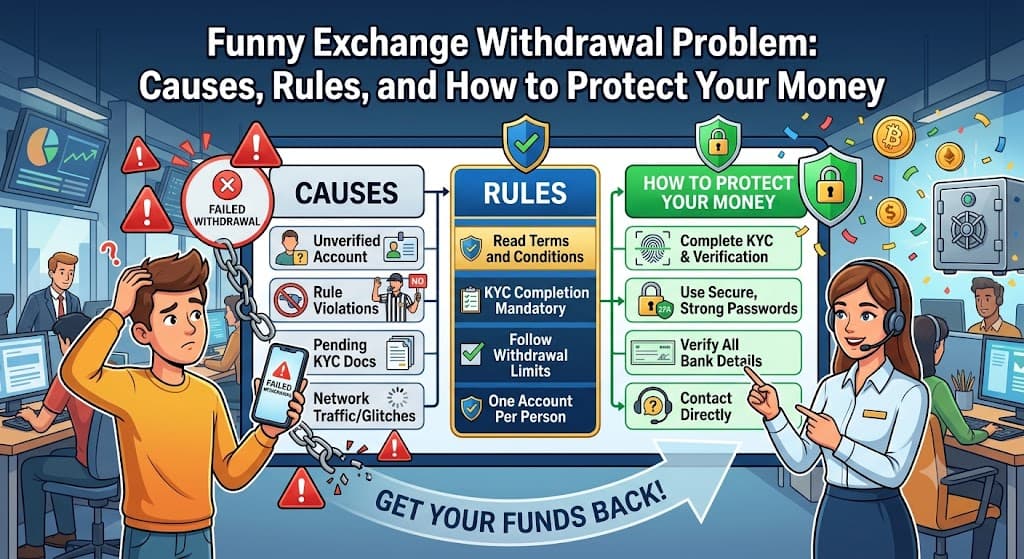
Funny Exchange Withdrawal Problem: Causes, Rules, and How to Protect Your Money
Requesting a cashout only to see your balance stuck in limbo is one of the most frustrating experiences for online gaming and sports exchange players. In recent months, reports across Indian consumer forums and cyber-crime portals have highlighted widespread cases of users facing a serious Funny Exchange game withdrawal problem. Players frequently notice that after requesting a payout, their funds show as a Funny Exchange withdrawal pending request for days or weeks without ever reaching their bank account.
Understanding official transaction terms, internal turnover conditions, and external regulatory risks is essential before you make another deposit. This guide breaks down the real reasons behind the Funny Exchange withdrawal problem, explains the strict Funny Exchange withdrawal rules, reviews expected Funny Exchange withdrawal time frames, and provides steps to take if your funds remain withheld.
1. What Causes a Funny Exchange Withdrawal Problem?
When a payout request fails or stalls, users are often left wondering what went wrong behind the scenes. Analysis of common player complaints on consumer boards reveals key patterns behind the Funny Exchange withdrawal problem:
- Unregulated Platform Risk: In India, real-money online gaming and wagering exchanges operate under strict legal oversight. Unlicensed entities function in a legally gray area, meaning there are no standard regulatory safeguards forcing the platform to honor cashout requests promptly.
- Third-Party Payment Gateway Failures: Many transactions move through peer-to-peer (P2P) merchant UPI accounts. If a merchant virtual payment address (VPA) gets frozen by a domestic bank for suspicious high-volume activity, outbound transfers stop instantly.
- Internal Turnover & Wagering Locks: A payout request often fails because a user has not wagered 100% of their deposited funds at least once before requesting a payout.
- Sudden Account Freezes: In worst-case scenarios flagged on consumer complaint forums, users report winning large payouts only to experience a sudden account block right after filing a withdrawal request.
Recognizing these triggers helps you avoid repeating common mistakes and helps you determine whether your delayed transfer is a temporary banking glitch or a permanent account freeze.
2. Dealing with a Funny Exchange Withdrawal Pending Status
Seeing your withdrawal request stuck on “Pending” or “Processing” for hours can be stressful. When you encounter a Funny Exchange withdrawal pending message, follow these initial troubleshooting steps:
- Check the 24-Hour Rule: Platform transaction policies state that players are usually allowed only one pending request at any given time per 24-hour cycle. Trying to submit a second cashout while the first is unresolved will trigger an automatic error.
- Verify Transaction Slips: Open your account profile history. If the status says “Successful” on the platform but the money is not in your bank, take a clear screenshot of the transaction ID and timestamp immediately.
- Avoid Canceling the Request: Repeatedly canceling a pending request and re-submitting it resets your place in the processing queue and can trigger anti-fraud security filters.
- Check Bank Server Outages: Check whether your local bank or UPI app (PhonePe, Google Pay, Paytm) is running maintenance on direct IMPS rails.
If your Funny Exchange withdrawal pending screen does not resolve after standard processing windows, relying solely on in-app chat rarely fixes the issue without formal proof.
3. Strict Terms: Understanding the Official Funny Exchange Withdrawal Rules
Before the platform will clear any balance payout, you must comply with specific operational policies. Overlooking these Funny Exchange withdrawal rules is one of the most common reasons requests get rejected or returned to your gaming balance:
- The 1x Deposit Turnover Condition: Under anti-money laundering and fair-play guidelines, every deposit must be wagered at least once (1x turnover) before you can withdraw it. For example, if you deposit ₹2,000, you must place valid bets totaling at least ₹2,000 before a payout becomes unlockable.
- Bonus Fund Restrictions: Funds credited as promotional rewards or match bonuses cannot be withdrawn directly to a bank account. You must clear all rollover targets linked to the promotion first.
- Matching Bank Account Identity: The name registered on your exchange profile must match the legal name on your receiving bank account or UPI handle. Mismatched account names result in instant rejections.
- Minimum and Maximum Limits: Ensure your request falls within daily limits—typically a minimum of ₹500 for UPI transfers and ₹1,000 for direct bank transfers (IMPS).
- Single Account Policy: Operating duplicate or secondary accounts from the same device, IP address, or mobile number violates the core Funny Exchange withdrawal rules and can lead to immediate forfeiture of your entire balance.
4. Expected Funny Exchange Withdrawal Time Across Payment Methods
Under normal platform operating conditions, payout processing speeds vary depending on the chosen payout channel and network traffic. Here is what users should expect regarding Funny Exchange withdrawal time:
- Instant UPI (Google Pay, PhonePe, Paytm): Under regular conditions, automated UPI settlements take between 15 minutes to 2 hours.
- Direct Bank Transfer (IMPS / NEFT): Domestic bank settlements usually process within 2 to 6 hours during standard banking days, but can take up to two full business days during bank holidays or weekend maintenance windows.
- Manual Compliance Reviews: If your account undergoes an automated risk review or identity check, the expected Funny Exchange withdrawal time can extend anywhere from 24 to 48 hours.
If your Funny Exchange withdrawal time extends beyond 48 hours without any communication from support, your transaction is officially stalled and requires manual escalation.
5. How to Obtain Legitimate Funny Exchange Withdrawal Proof
When dealing with delayed payouts or missing funds, having organized records is essential. Creating verified Funny Exchange withdrawal proof allows you to show transaction histories to customer care, consumer arbitration portals, or your bank:
- Save the In-App Transaction Receipt: Take full-screen screenshots displaying the unique transaction ID, requested amount, wallet deduction, and date/time.
- Obtain Your Official Bank Statement: Download an official PDF bank statement or UPI passbook showing that no credit matching the transaction ID occurred during that time period.
- Save Support Chat Transcripts: Record or screenshot all chat interactions with customer support representatives, noting dates, ticket numbers, and the representative’s name or ID.
Presenting organized Funny Exchange withdrawal proof is the only way to challenge false “Transaction Successful” statuses when money never reaches your account.
6. How to Resolve a Persistent Funny Exchange Withdrawal Problem
If your cashout remains stuck, you need to take structured steps to resolve the issue:
- Step 1: Check In-Game Account Balance: Look at your active wallet. If a rejected payout bounced back into your gaming balance, check whether a turnover condition or incorrect bank IFSC code was cited as the reason.
- Step 2: Contact Official Help Channels: Send an email to the official support address (support@betinexchange.com or platform in-app helpdesk) attaching your screenshots, player ID, and bank statement. Avoid sharing your account password.
- Step 3: Never Send Additional “Recovery” Deposits: A common trap reported on consumer forums involves unverified agents asking players to deposit “10% to 20% extra as a verification or tax charge” to unlock their pending balance. Never send more money; this is a clear sign of secondary fraud.
- Step 4: File Formal Consumer Complaints: If support remains unresponsive, register a formal complaint on the National Consumer Complaints Court (consumercomplaintscourt.com) or the government National Consumer Helpline (NCH) portal.
- Step 5: Report to Cyber-Crime Authorities: In cases where substantial funds were withheld without cause or accounts were blocked following a payout request, file an incident report at the official portal (cybercrime.gov.in) or call the toll-free cyber fraud helpline (1930).
Frequently Asked Questions
What is a funny exchange apk and why do people download it?
A funny exchange apk is the Android installation file for the platform. Players download it to access their gaming accounts, check live charts, and play rounds without opening a mobile browser each time.
Is it safe to do a funny exchange apk download on my Android phone?
It can be safe when the APK comes directly from the official website. Avoid unverified third-party sources, as they may provide modified or harmful files.
How do I install the funinexchange APK download on Android?
After the funinexchange APK download is complete, tap the file to begin installation. You may need to allow your browser or file manager to install apps from unknown sources, then turn the permission off again after setup.
What should I do if my fun exchange apk file fails to install?
Check that your phone has enough free storage and that the APK file downloaded completely. A stable Wi-Fi connection and a compatible, updated Android version can also help resolve installation problems.
Where can I find the fun in exchange apk latest version?
The latest version should be obtained directly from the official platform website. Keeping the app updated can provide recent security patches, bug fixes, and performance improvements.
Are modified fun exchange app download APK mod files safe to use?
No, modified APK files from unknown third parties can be unsafe. They may contain malicious code, malware, or spyware that could put your personal information and device security at risk.
Why does my phone block the Funin Exchange APK download?
Android devices can block apps installed outside the Google Play Store by default. If the APK is from a trusted official source, you may need to grant temporary installation permission in your device settings.
Do I need to uninstall an old version before running a funinexchange app download apk?
It is generally best to remove an outdated version before installing a fresh APK when required. This can help prevent file conflicts, login issues, and performance problems.
Can I use the funny exchange game apk on an iPhone or iOS device?
No, APK files are designed for Android devices and do not run directly on iPhones or iPads. iOS users generally access compatible platforms through a mobile web browser instead.
What are the system requirements for the funny exchange apk download for android?
The app requires a compatible Android smartphone, enough free storage, and a stable internet connection. An updated Android operating system can also help provide smoother app performance.